Rexall Formulary Auto-Sub
When filling a prescription with a non-primary generic or brand medication, Nexxsys automatically switches to the primary generic based on the Rexall Formulary
If a non-primary generic or brand medication is required, use the dropdown's below to learn more information about each scenario.
 Using Non-Compliant Generic Drugs
When filling a prescription, a generic drug that does not adhere to Rexall Formulary (Primary or Secondary) may be required.
To use a generic drug that does not adhere to the Rexall Formulary:
- In Rx Detail, select Rx > Interchangeables. The Drug Interchangeables window appears.
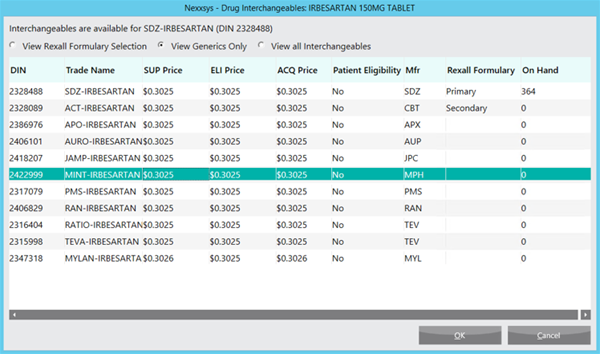
- Highlight the interchangeable drug from the list.
- Select OK. The Rexall Formulary Compliance window appears.

- From the Reason dropdown, select the reason the non-compliant generic is being used.
Note: If the Pharmacist Professional Judgement reason is selected, a comment must be added.
- Select OK. The Rx Detail window appears and the drug has been replaced with the interchangeable selected.
Using a Brand Name Drug
If the patient or doctor has requested a specific brand be dispensed, the automatic primary generic substitution can be reversed.
To use a brand name drug:
- In Rx Detail, select Rx > Interchangeables. The Drug Interchangeables window appears.
- Select the View all Interchangeables option.
- Highlight the brand name interchangeable drug from the list.
- Select OK. The Rexall Formulary Compliance window appears.
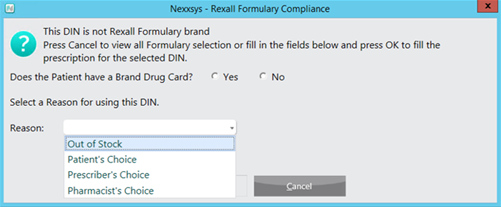
- Select whether the patient has a Brand Drug Card.
- From the Reason dropdown, select the reason the brand name is being used.
Note: If the Out of Stock option was selected, when refilling the prescription a prompt will appear to select the generic. Otherwise, the choice of brand will be retained on future fills.
- Select OK. The Rx Detail window appears and the drug has been replaced with the interchangeable selected and an Alert displays indicating that the generic was substituted for the brand by the specific user.

Using a Brand Name Drug (ODB) - ONTARIO ONLY
Some patients covered by ODB may have an Adverse Reaction (ADR) Form on file. If so, it is required that the brand name drug is filled.
To use the brand name drug when billing to ODB:
- In Rx Detail, select Rx > Interchangeables. The Drug Interchangeables window appears.
- Select the View all Interchangeables option.
- Highlight the brand name interchangeable drug from the list.
- Select OK. The Rexall Formulary Compliance window appears.
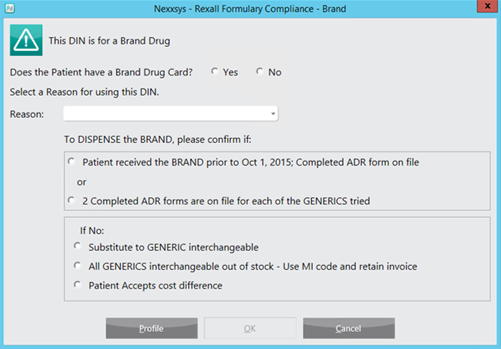
- Select whether the patient has a Brand Drug Card.
- From the Reason dropdown, select the reason the brand name is being used.
Note: The Prescriber's Choice reason cannot be selected without a valid ADR form on file.
If the Out of Stock option was selected, when refilling the prescription a prompt will appear to select the generic. Otherwise, the choice of brand will be retained on future fills. - Select an appropriate option to confirm why the brand name drug is being dispensed.
- Select OK. The Rx Detail window appears and the drug has been replaced with the interchangeable selected and an Alert displays indicating that the generic was substituted for the brand by the specific user.
Using a Brand Name Drug (NIHB)
Some patients covered by NIHB may have an Adverse Reaction (ADR) Form on file. If so, it is required that the brand name drug is filled.
To use the brand name drug when billing to NIHB:
- In Rx Detail, select Rx > Interchangeables. The Drug Interchangeables window appears.
- Select the View all Interchangeables option.
- Highlight the brand name interchangeable drug from the list.
- Select OK. The Rexall Formulary Compliance window appears.
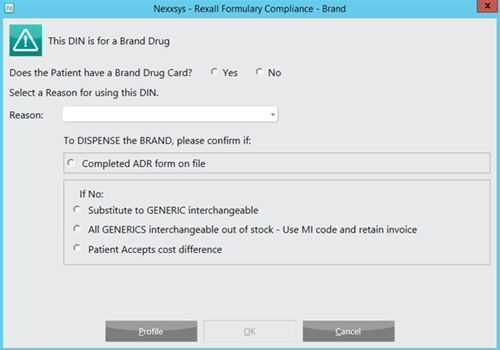
- Select whether the patient has a Brand Drug Card.
- From the Reason dropdown, select the reason the brand name is being used.
Note: The Prescriber's Choice reason cannot be selected without a valid ADR form on file.
If the Out of Stock option was selected, when refilling the prescription a prompt will appear to select the generic. Otherwise, the choice of brand will be retained on future fills. - Select an appropriate option to confirm why the brand name drug is being dispensed.
- Select OK. The Rx Detail window appears and the drug has been replaced with the interchangeable selected and an Alert displays indicating that the generic was substituted for the brand by the specific user.